Return to the Outdoor Eyes home page. Subscribe to the free outdoor photography and outdoor adventure newsletter. Send free outdoor adventure photo ecards. Join the Outdoor Photography Forum and the Find A Partner Community. Complete Outdoor Adventure Index: outdoor adventure tips, tutorials, techniques and articles on hiking, kayaking, gps, snowshoeing, backpacking, birding, camping, expeditions and more. Complete Outdoor Photography Index: outdoor photography tips, tutorials, techniques and articles on nature photography, wildlife photography, bird photography, gear, promoting yourself, marketing, digital editing, adobe photoshop actions and more. The Gallery index of photographers from around the world. Search the Gallery to view or purchase photographs. Learn how to create your own Gallery. Submit your favorite photograph in the outdoor photography contest. Contest winners receive a free gallery. Digital editing techniques, tips, tutorials, articles and download adobe photoshop actions. Photography techniques, tips, tutorials, and articles. Wildlife photography tips, tutorials, techniques and articles. How to photograph national parks, wildlife and nature.  Nature photography tips, tutorials, techniques and articles. How to use and how to choose photography gear. How to promote, sell your photographs and also helpful marketing articles to help you promote yourself. Bird photography tips, tutorials, techniques and articles. The Outdoor Eyes Find A Partner Community is for members to find friends to participate in your outdoor activities. Submit an outdoor adventure or a photography article for the Outdoor Eyes monthly newsletter. Your article will also be listed in the Outdoor Eyes indexes. Read the stories behind the outdoor adventures and expeditions. Birding, wildlife tracking tips, tutorials, techniques and articles. Nature & outdoor tips, tutorials, techniques and articles. Hiking, camping and backpacking tips, tutorials, techniques and articles. Trail guides to National Park trails and state trails. Snowshoeing tips, tutorials, techniques and articles. Kayaking tips, tutorials, techniques and articles. Download GPS waypoints for hiking and kayaking. GPS tips, techniques and articles.

Click here to visit Tom Dillon.
Tom Dillon's Gallery:Click here to view 2 thumbnail images from Tom Dillon's Gallery.Click here to learn about Tom Dillon.Click here to view Tom Dillon's photograph sizes & prices.Click here to read the visitor comments about Tom Dillon's Gallery.Click here to contact Tom Dillon by email. Visit
Tom Dillon is a new photographer in the Gallery. Take a look!
Sell your photographs online. Join the many amateur, advanced & professional photographers from around the world. Learn how to create your own Gallery.
Have great outdoor adventures with your No limits... No boundaries Outdoor Eyes Cap!

Creating Light Effects Templates With Adobe Photoshop
Photography and Text By Brandon Batie (forum contributor)  © All rights reserved.

Brandon Batie Photography © Brandon Batie
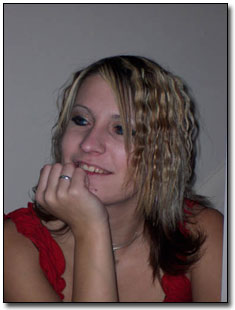
Before
Brandon Batie Photography © Brandon Batie
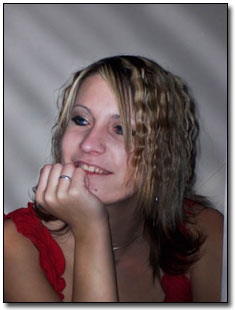
After

Overview:
It’s seldom when shooting outdoor wildlife images when the light catches the scene just right. Most of us spend more time in programs like Photoshop tweaking photos and making adjustments than we do in the field taking photos. It is for this reason that I have started a lighting templates folder on my hard drive. These templates are grayscale images that can be blended onto a photo image to adjust the lighting or add lighting effects, such as streaks and even fog effects.
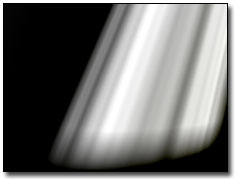
 
Brandon Batie Photography © Brandon Batie We can add the template image on the right to an image in Photoshop and change the blending modes to get various lighting effects. Using the Screen mode gives us the most natural looking light, while overlay will give us a lot of contrast. We can also change the opacity of the lighting template to make our effect subtler. We can use some of the other modes for wilder effects and even use color templates instead of grayscale for wild lighting and visual effects.
 
The templates can be useful and time saving for many photographs, but many will require custom effects. To do creative custom effects I will create a new layer and set the mode, usually Screen for the natural lighting. Then I will use the Airbrush with a low flow and opacity to ‘brush’ light where I need it using a white paint, or, use a black paint and brush in shadows.
 
As you can see, there are many ways to skin a cat. The various techniques will give slightly various results. By learning as many as you can it will give you a wide range of effects than can be easily achieved for some very cool effects, and, in the end, some very cool photos.


Risk free OPEN YOUR OWN GALLERY & SELL YOUR PHOTOGRAPHS ONLINE

PROMOTION TODAY: A 25% discount is available for a Professional Gallery Registration.
PROMOTION ENDS: Monday, May 12, 2008.

RISK FREE GUARANTEED: If you're not satisfied with The Gallery, cancel anytime within 30 days, and you will receive a FULL refund.
 Click here to about the gallery.

Outdoor Eyes Welcomes The Newest Gallery Members: Jim Sawhill, John Waggoner, Frank Castellano, james caine, Toni Leland, Deborah Simone, Donny Doyle, RG DeMartin, Bonnie Valentine, Hans Schroeder, Elena & Dennis Workman
Search Outdoor Eyes For Educational Articles, Photographs, Photographers & Ecards.
Search For:    In the:    
Photography Outdoor Adventure The Gallery Forum Contact OE OE Caps Newsletter Site Map Ecards Find A Partner Home
Use Of Information    © 2000-2008 Outdoor Eyes   All rights reserved.  Privacy & Terms