Return to the Outdoor Eyes home page. Outdoor Adventure broadcast network. Live and pre-recorded. Send free outdoor adventure photo ecards. Join the Outdoor Photography Forum and the Find A Partner Community. Complete Outdoor Adventure Index: outdoor adventure tips, tutorials, techniques and articles on hiking, kayaking, gps, snowshoeing, backpacking, birding, camping, expeditions and more. Complete Outdoor Photography Index: outdoor photography tips, tutorials, techniques and articles on nature photography, wildlife photography, bird photography, gear, promoting yourself, marketing, digital editing, adobe photoshop actions and more. The Gallery index of photographers from around the world. Search the Gallery to view or purchase photographs. Learn how to create your own Gallery. Subscribe to the free outdoor photography and outdoor adventure newsletter. Read the stories behind the outdoor adventures and expeditions. Nature & outdoor tips, tutorials, techniques and articles. Download GPS waypoints for hiking and kayaking. GPS tips, techniques and articles. Birding, wildlife tracking tips, tutorials, techniques and articles. Hiking, camping and backpacking tips, tutorials, techniques and articles. Trail guides to National Park trails and state trails. Snowshoeing tips, tutorials, techniques and articles. Kayaking tips, tutorials, techniques and articles. Outdoor Eyes Blog. Submit your favorite photograph in the outdoor photography contest. Contest winners receive a free gallery. How to use and how to choose photography gear. Photography techniques, tips, tutorials, and articles. How to promote, sell your photographs and also helpful marketing articles to help you promote yourself. Wildlife photography tips, tutorials, techniques and articles. Bird photography tips, tutorials, techniques and articles. How to photograph national parks, wildlife and nature.  Nature photography tips, tutorials, techniques and articles. Digital editing techniques, tips, tutorials, articles and download adobe photoshop actions.

Click here to visit OE Photography & Outdoor Adventure Forum.
OE Photography & Outdoor Adventure Forum
Join the Outdoor Eyes Photography & Outdoor Adventure Forum. A great bunch of members and you will learn a lot!
  Play for fun & WIN GUMPbucks for you to use for dining at your favorite restaurants.

Adjusting Contrast & Bring Out Shadow Detail Technique
Photography And Text By Mahesh (subscriber contributor) © All rights reserved.

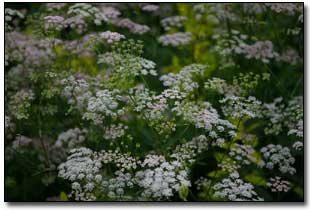
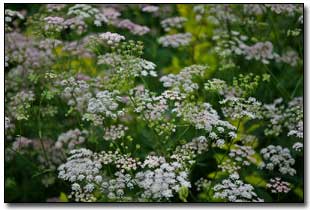
Set-up Photography © Mahesh Before Set-up Photography © Mahesh After

With digital, it behooves one to shoot for the highlights. But this forces you to compromise a bit at the shadows. In addition, many of us shoot with low contrast to make sure we get as much dynamic range as possible, opting to adjust the contrast/curves later in Photoshop. Here are the steps I take to quickly adjust contrast and bring out some shadow detail.
 
1. Open the file. Choose File --> Open --> Enter the image name to be fixed.
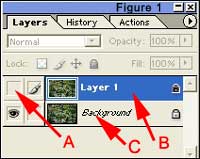
2. Choose Layer ---> Duplicate Layer (Ctrl J) to duplicate the layer, which will create a "background copy (Layer 1)" layer (Figure 1 B).

Adobe Window Adobe Window

3. In your layers palette, click on the little eye icon to the left of the "background copy" layer to make that layer invisible (Figure 1 A).
4. Click on the "background" layer to make that layer active (Figure 1 C).
5. Perform an auto contrast on this "background" layer (Ctrl-Alt-Shift-L). Don't worry if the highlights get blown.
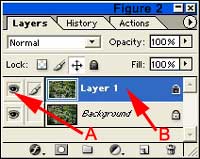
6. Now click on the "background copy" layer to make it active and the little eye icon to the left of this layer should be seen again (Figure 4 A & B).
7. Choose Select ---> Color Range. Under the Select drop down menu choose "Shadows" from the list and click "OK".
8. Choose Select ---> Feather. In the "Feather" window, choose a relatively large feather radius value (between 50-120 or so) and click "OK". For the above image, 75 was chosen.
9. Choose Select ---> Inverse to invert the selection (Ctrl-Shift-I)

10. Choose Layer ---> Add Layer Mask ---> Reveal Selection.
11. Choose Layer ---> Flatten Image to flatten the layers. Save the file with a new name.


Risk free OPEN YOUR OWN GALLERY & SELL YOUR PHOTOGRAPHS ONLINE

PROMOTION TODAY: ALL Advanced Gallery Registrations will receive a FREE UPGRADE to a Professional Gallery Registration.
PROMOTION ENDS: .

RISK FREE GUARANTEED: If you're not satisfied with The Gallery, cancel anytime within 30 days, and you will receive a FULL refund.
 Click here to about the gallery.

Outdoor Eyes Welcomes The Newest Gallery Members: Chris Elsom, Nimrat Singh
  
The Gallery Photography Outdoor Adventure Forum Contact OE Estes Park APP Site Map Blog 7522 Web TV Enjoy Estes Park Home

casinoGUMP

Use Of Information    © 2000- ImageN Network   All rights reserved.  Privacy & Terms