Return to the Outdoor Eyes home page. Subscribe to the free outdoor photography and outdoor adventure newsletter. Send free outdoor adventure photo ecards. Join the Outdoor Photography Forum and the Find A Partner Community. Complete Outdoor Adventure Index: outdoor adventure tips, tutorials, techniques and articles on hiking, kayaking, gps, snowshoeing, backpacking, birding, camping, expeditions and more. Complete Outdoor Photography Index: outdoor photography tips, tutorials, techniques and articles on nature photography, wildlife photography, bird photography, gear, promoting yourself, marketing, digital editing, adobe photoshop actions and more. The Gallery index of photographers from around the world. Search the Gallery to view or purchase photographs. Learn how to create your own Gallery. Submit your favorite photograph in the outdoor photography contest. Contest winners receive a free gallery. Digital editing techniques, tips, tutorials, articles and download adobe photoshop actions. Photography techniques, tips, tutorials, and articles. Wildlife photography tips, tutorials, techniques and articles. How to photograph national parks, wildlife and nature.  Nature photography tips, tutorials, techniques and articles. How to use and how to choose photography gear. How to promote, sell your photographs and also helpful marketing articles to help you promote yourself. Bird photography tips, tutorials, techniques and articles. Outdoor Eyes Site Index. This is no ordinary apparel... it is your adrenaline rush. No limits.... No boundaries. Read the stories behind the outdoor adventures and expeditions. Birding, wildlife tracking tips, tutorials, techniques and articles. Nature & outdoor tips, tutorials, techniques and articles. Hiking, camping and backpacking tips, tutorials, techniques and articles. Trail guides to National Park trails and state trails. Snowshoeing tips, tutorials, techniques and articles. Kayaking tips, tutorials, techniques and articles. Download GPS waypoints for hiking and kayaking. GPS tips, techniques and articles.

Click here to visit Tom McGinty.
Tom McGinty's Gallery:Click here to view 2 thumbnail images from Tom McGinty's Gallery.Click here to view Tom McGinty's photograph sizes & prices.Click here to read the visitor comments about Tom McGinty's Gallery.Click here to contact Tom McGinty by email. Visit
Nature Photography by Tom McGinty
Sell your photographs online. Join the many amateur, advanced & professional photographers from around the world. Learn how to create your own Gallery.
You have an adventure in mind and it is not going to be easy. You want to have a strong frame-of-mind to succeed. Put it on. This is no ordinary cap... it is your adrenaline rush. No limits.... No boundaries. YOU WILL SUCCEED!

Create Fog Techique With Adobe Photoshop
Photography and Text By Bill Richardson © All rights reserved.


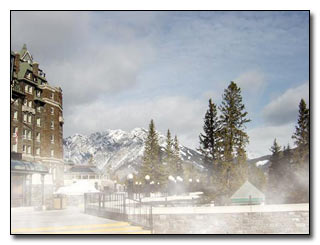
Fog Digital Photography © Bill Richardson

Sometimes you might want to add a little fog to your photograph to give your photograph a totally different look. The following instructions describe how to add fog to your photograph using Adobe Photoshop.
 
1. Open the file. Choose File --> Open --> Enter the image name to be fixed.
2. Hold the Ctrl Key down and hit the + key a few times to zoom in the image to a size you need to work with.
3. Using the Lasso Tool on the toolbar, outline an area that you want to be fogged with zero (0) feathering)
4. Put the selected area on its own layer by either (Ctrl+J) or Choose Layer --> New --> Layer Via Copy.

Tools Digital Photography © Outdoor Eyes Tools Digital Photography © Outdoor Eyes

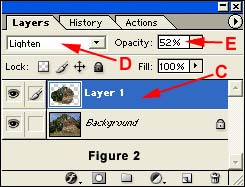
6. On the layers palette, click the Layer 1 Thumbnail while at the same time holding the Ctrl key down (Figure 2 - C). This will create a selection outline around layer.
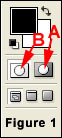
7. Use Quick Mask by clicking the "Select Edit In Quick Mask Mode Button located at the bottom right of the toolbox (Figure 1 - A).
8. Choose Filter --> Blur --> Gaussian Blur to blur the Quick Mask (start with 95 pixels and change to suit your taste).
9. Exit Quick Mask by clicking on the "Edit In Standard Mode Button" located at the bottom left of the toolbox (Figure 1 - B).
10. Deselect the selected area by either (Ctrl+D) or Choose Select --> Deselect.
11. Click on Layer 1 Thumbnail (Figure 2 - C). From the pull down layer types, change the layer from Normal to Lighten (Figure 2 - D).
12. On the Layer 1 Thumbnail change the opacity from 100% to a lower percent to suit your taste (Figure 2 - E).

13. Save the image with a new file name.


Risk free OPEN YOUR OWN GALLERY & SELL YOUR PHOTOGRAPHS ONLINE

PROMOTION TODAY: ALL Advanced Gallery Registrations will receive a FREE UPGRADE to a Professional Gallery Registration.
PROMOTION ENDS: Saturday, May 17, 2008.

RISK FREE GUARANTEED: If you're not satisfied with The Gallery, cancel anytime within 30 days, and you will receive a FULL refund.
 Click here to about the gallery.

Outdoor Eyes Welcomes The Newest Gallery Members: Jim Sawhill, John Waggoner, Frank Castellano, Chuck Cavanaugh, james caine, Deborah Simone, Donny Doyle, RG DeMartin, Bonnie Valentine, Hans Schroeder, Elena and Dennis Workman
Search Outdoor Eyes For Educational Articles, Photographs, Photographers & Ecards.
Search For:    In the:    
Photography Outdoor Adventure The Gallery Forums Contact OE OE Apparel Newsletter Site Map Ecards Home
Use Of Information    © 2000-2008 Outdoor Eyes   All rights reserved.  Privacy & Terms