Return to the Outdoor Eyes home page. Outdoor Adventure broadcast network. Live and pre-recorded. Send free outdoor adventure photo ecards. Join the Outdoor Photography Forum and the Find A Partner Community. Complete Outdoor Adventure Index: outdoor adventure tips, tutorials, techniques and articles on hiking, kayaking, gps, snowshoeing, backpacking, birding, camping, expeditions and more. Complete Outdoor Photography Index: outdoor photography tips, tutorials, techniques and articles on nature photography, wildlife photography, bird photography, gear, promoting yourself, marketing, digital editing, adobe photoshop actions and more. The Gallery index of photographers from around the world. Search the Gallery to view or purchase photographs. Learn how to create your own Gallery. Subscribe to the free outdoor photography and outdoor adventure newsletter. Read the stories behind the outdoor adventures and expeditions. Nature & outdoor tips, tutorials, techniques and articles. Download GPS waypoints for hiking and kayaking. GPS tips, techniques and articles. Birding, wildlife tracking tips, tutorials, techniques and articles. Hiking, camping and backpacking tips, tutorials, techniques and articles. Trail guides to National Park trails and state trails. Snowshoeing tips, tutorials, techniques and articles. Kayaking tips, tutorials, techniques and articles. Outdoor Eyes Blog. Submit your favorite photograph in the outdoor photography contest. Contest winners receive a free gallery. How to use and how to choose photography gear. Photography techniques, tips, tutorials, and articles. How to promote, sell your photographs and also helpful marketing articles to help you promote yourself. Wildlife photography tips, tutorials, techniques and articles. Bird photography tips, tutorials, techniques and articles. How to photograph national parks, wildlife and nature.  Nature photography tips, tutorials, techniques and articles. Digital editing techniques, tips, tutorials, articles and download adobe photoshop actions.

Click here to visit OE Photography & Outdoor Adventure Forum.
OE Photography & Outdoor Adventure Forum
Join the Outdoor Eyes Photography & Outdoor Adventure Forum. A great bunch of members and you will learn a lot!
  Play for fun & WIN GUMPbucks for you to use for dining at your favorite restaurants.

Advanced Blue Sky Enhancement With Adobe Photoshop
Photography By Philip Tulin and Text By Kent Christiansen © All rights reserved.

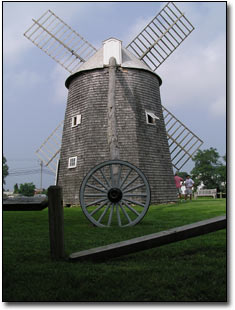
Windmill Digital Photography © Outdoor Eyes
Before
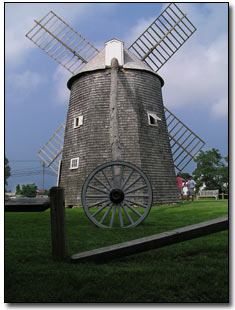
Windmill Photography © Outdoor Eyes
After

Sometimes the sky does not cooperate when a great photograph opportunity comes by. This technique only applies to photographs that have a decent blue sky to begin with. Using the technique described below will alter the color of the blue sky in your photograph.


How To Apply A Blue Sky To A Section Of Your Photograph

Note: This technique assumes that there are already clouds and a blue sky in your photograph.
 
1. Open the file. Choose File --> Open --> Enter the image name to be fixed.
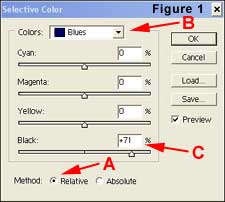
2. Choose Image --> Adjust -->Selective Color and click on the RELATIVE box to activate relative (Figure 1 A).

Selective Color

3. Select BLUE as the target color and adjust the BLACK slider to the right to fit your taste of the blue color (Figure 1 B & C).
4. Select CYAN as the target color and adjust the BLACK slider to the right to fit your taste of the blue color.
5. Click the ABSOLUTE box to see the difference between absolute and relative. Choose one of the settings and click OK.
6. Make a luminosity selection by holding the Ctl and Alt key down and clicking the ~ key (located in the top left section of the keyboard under the Esc Key).
7. Make a duplicate copy of the image by either (Ctl+J) or Choose Layer --> New --> Layer Via Copy.

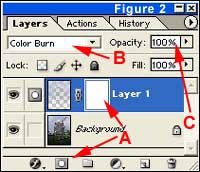
Layer Screen

8. Select the new layer.
9. Set the new layer's mode Blending Option to COLOR BURN (Figure 2 B) (or MULTIPLY for a less intense effect).
10. Adjust the layer Opacity to suit your taste looking at the sky only (Figure 2 C).
11. Add a LAYER MASK to the new layer by clicking on the the LAYER MASK icon at the bottom of the layers palette (Figure 2 A).
12. With the LAYER MASK still active (Figure 2 A), choose a large soft edged brush (150) set to REDUCED FLOW (25%). Adjust the brush settings to what is needed for your particular situation. Set the color to black and paint slowly over the clouds and the all the areas on the rest of the photograph that are not to be darkened. Change the color to white to correct any area that needs to be darkened again.
 
13. When you are satisfied with the finished image, save the file.



Risk free OPEN YOUR OWN GALLERY & SELL YOUR PHOTOGRAPHS ONLINE

PROMOTION TODAY: ALL Advanced Gallery Registrations will receive a FREE UPGRADE to a Professional Gallery Registration.
PROMOTION ENDS: .

RISK FREE GUARANTEED: If you're not satisfied with The Gallery, cancel anytime within 30 days, and you will receive a FULL refund.
 Click here to about the gallery.

Outdoor Eyes Welcomes The Newest Gallery Members: Chris Elsom, Nimrat Singh
  
The Gallery Photography Outdoor Adventure Forum Contact OE Estes Park APP Site Map Blog 7522 Web TV Enjoy Estes Park Home

casinoGUMP

Use Of Information    © 2000-   All rights reserved.  Privacy & Terms