Return to the Outdoor Eyes home page. Outdoor Adventure broadcast network. Live and pre-recorded. Send free outdoor adventure photo ecards. Join the Outdoor Photography Forum and the Find A Partner Community. Complete Outdoor Adventure Index: outdoor adventure tips, tutorials, techniques and articles on hiking, kayaking, gps, snowshoeing, backpacking, birding, camping, expeditions and more. Complete Outdoor Photography Index: outdoor photography tips, tutorials, techniques and articles on nature photography, wildlife photography, bird photography, gear, promoting yourself, marketing, digital editing, adobe photoshop actions and more. The Gallery index of photographers from around the world. Search the Gallery to view or purchase photographs. Learn how to create your own Gallery. Subscribe to the free outdoor photography and outdoor adventure newsletter. Read the stories behind the outdoor adventures and expeditions. Nature & outdoor tips, tutorials, techniques and articles. Download GPS waypoints for hiking and kayaking. GPS tips, techniques and articles. Birding, wildlife tracking tips, tutorials, techniques and articles. Hiking, camping and backpacking tips, tutorials, techniques and articles. Trail guides to National Park trails and state trails. Snowshoeing tips, tutorials, techniques and articles. Kayaking tips, tutorials, techniques and articles. Outdoor Eyes Blog. Submit your favorite photograph in the outdoor photography contest. Contest winners receive a free gallery. How to use and how to choose photography gear. Photography techniques, tips, tutorials, and articles. How to promote, sell your photographs and also helpful marketing articles to help you promote yourself. Wildlife photography tips, tutorials, techniques and articles. Bird photography tips, tutorials, techniques and articles. How to photograph national parks, wildlife and nature.  Nature photography tips, tutorials, techniques and articles. Digital editing techniques, tips, tutorials, articles and download adobe photoshop actions.

Click here to visit OE Photography & Outdoor Adventure Forum.
OE Photography & Outdoor Adventure Forum
Join the Outdoor Eyes Photography & Outdoor Adventure Forum. A great bunch of members and you will learn a lot!
  Play for fun & WIN GUMPbucks for you to use for dining at your favorite restaurants.

How To Use The Batch Process & Actions With Adobe Photoshop
Photography and Text By Philip Tulin © All rights reserved.

Sometimes you need to use the same Adobe Photoshop action on multiple images. You could open each image one at a time and use the necessary action on the image or you can use the batch process to make your work faster and more efficient.


How To Use The Batch Process
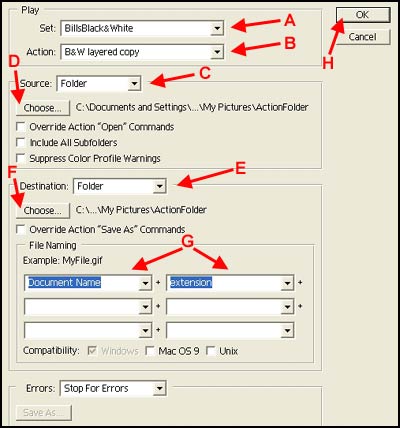
 
Batch Process Screen

Before starting the batch process, make a new folder in your computer named ActionFolder. Copy (Not Move) the images to this folder that you want to process. You now will have a duplicate copy of all your images after the action has been run and you will not lose any of your original images. In this example, the images are batch processed and copied back to the same folder over the original image. The image used is a duplicate copy of the original so the original image is not lost.
 
1. Choose File --> Automate --> Batch.
2. Select the Action that will be applied to each image (A).
3. If the action has multiple choices within the action, select the Action Choice (B). If the action only has one part, a choice will not be necessary.
4. Set Source to Folder (C). Click the Choose button (D) and select the Folder that the images are located in (ActionFolder). Leave all of the next 3 boxes unchecked.
5. Set Destination to Folder (E). Click the Choose button (D) and select the Folder that the images are located in (ActionFolder). After the action has been run, the changed image will be copied over the original image in the ActionFolder.
6. Set the File Naming to Document Name and Extension to use the original image name (G). You always have the option to specify a naming scheme for saving your images so the new ones will not write over the old copies.
7. Click the OK button to run the batch (H).


Risk free OPEN YOUR OWN GALLERY & SELL YOUR PHOTOGRAPHS ONLINE

PROMOTION TODAY: ALL Advanced Gallery Registrations will receive a FREE UPGRADE to a Professional Gallery Registration.
PROMOTION ENDS: .

RISK FREE GUARANTEED: If you're not satisfied with The Gallery, cancel anytime within 30 days, and you will receive a FULL refund.
 Click here to about the gallery.

Outdoor Eyes Welcomes The Newest Gallery Members: Chris Elsom, Nimrat Singh
  
The Gallery Photography Outdoor Adventure Forum Contact OE Estes Park APP Site Map Blog 7522 Web TV Enjoy Estes Park Home

casinoGUMP

Use Of Information    © 2000- ImageN Network   All rights reserved.  Privacy & Terms

