Return to the Outdoor Eyes home page. Subscribe to the free outdoor photography and outdoor adventure newsletter. Send free outdoor adventure photo ecards. Join the Outdoor Photography Forum and the Find A Partner Community. Complete Outdoor Adventure Index: outdoor adventure tips, tutorials, techniques and articles on hiking, kayaking, gps, snowshoeing, backpacking, birding, camping, expeditions and more. Complete Outdoor Photography Index: outdoor photography tips, tutorials, techniques and articles on nature photography, wildlife photography, bird photography, gear, promoting yourself, marketing, digital editing, adobe photoshop actions and more. The Gallery index of photographers from around the world. Search the Gallery to view or purchase photographs. Learn how to create your own Gallery. Submit your favorite photograph in the outdoor photography contest. Contest winners receive a free gallery. Digital editing techniques, tips, tutorials, articles and download adobe photoshop actions. Photography techniques, tips, tutorials, and articles. Wildlife photography tips, tutorials, techniques and articles. How to photograph national parks, wildlife and nature.  Nature photography tips, tutorials, techniques and articles. How to use and how to choose photography gear. How to promote, sell your photographs and also helpful marketing articles to help you promote yourself. Bird photography tips, tutorials, techniques and articles. Outdoor Eyes Site Index. This is no ordinary apparel... it is your adrenaline rush. No limits.... No boundaries. Read the stories behind the outdoor adventures and expeditions. Birding, wildlife tracking tips, tutorials, techniques and articles. Nature & outdoor tips, tutorials, techniques and articles. Hiking, camping and backpacking tips, tutorials, techniques and articles. Trail guides to National Park trails and state trails. Snowshoeing tips, tutorials, techniques and articles. Kayaking tips, tutorials, techniques and articles. Download GPS waypoints for hiking and kayaking. GPS tips, techniques and articles.

Click here to visit Richard Johns.
Richard Johns's Gallery:Click here to view 2 thumbnail images from Richard Johns's Gallery.Click here to learn about Richard Johns.Click here to view Richard Johns's photograph sizes & prices.Click here to read the visitor comments about Richard Johns's Gallery.Click here to contact Richard Johns by email. Visit
Nature's Beauty
Sell your photographs online. Join the many amateur, advanced & professional photographers from around the world. Learn how to create your own Gallery.
Join The Outdoor Adventure Forum or the Photography Forum

The Use Of The History Brush To Combine Monotone w/Color With Adobe Photoshop
Photography and Text By Philip Tulin © All rights reserved.

Kayak Digital Photography © Outdoor Eyes
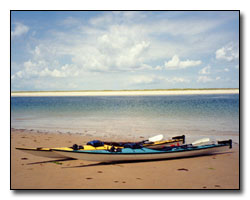
Before
Kayak Digital Photography © Outdoor Eyes
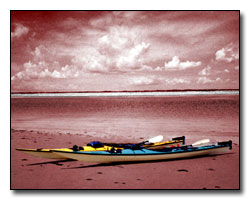
After

Sometimes you might want to combine monotone with color to produce a new look for your photograph. The history brush is very effective in helping to create that combination.

How To Apply Monotone Using The History Brush


Note: The history brush will not work properly if the photograph is resampled or the image size has been changed. The snapshots that are indicated below are not saved when the finished photograph is saved.
 
1. Open the file. Choose File --> Open --> Enter the image name to be fixed.
2. Hold the Ctrl Key down and hit the + key a few times to zoom the image to 100%.

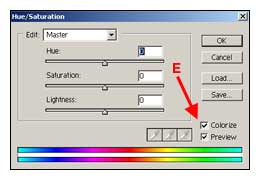
Hue Saturation Screen


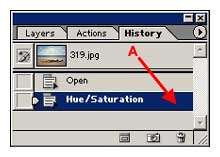
3. Choose Image --> Adjustment --> Hue/Saturation. Click the colorize box (E) and a check will appear. Click OK. The history screen will display the unsharpen mask as indicated in the image below (A).

History Screen

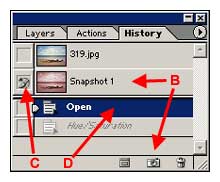
4. Click the camera located on the bottom of the history screen (B). A snapshot of the photography will appear named as Snapshot 1 (B).

Snapshot Screen

5. Select the history brush from the tool box and choose the brush size needed.
6. Click the box on the left side of Snapshot 1 (C). Click open on the history screen and the word open will be highlighted in blue (D).
7. Slowly paint the area that you want to appear in a monotone. You might want to use the Magic Wand to help isolate the sections that need to be painted.
8. You can add additional snapshots at any time if your image needs additional editing.

9. Save the image.


Risk free OPEN YOUR OWN GALLERY & SELL YOUR PHOTOGRAPHS ONLINE

PROMOTION TODAY: ALL Advanced Gallery Registrations will receive a FREE UPGRADE to a Professional Gallery Registration.
PROMOTION ENDS: Tuesday, July 8, 2008.

RISK FREE GUARANTEED: If you're not satisfied with The Gallery, cancel anytime within 30 days, and you will receive a FULL refund.
 Click here to about the gallery.

Outdoor Eyes Welcomes The Newest Gallery Members: Lamar Young, kimberly gretel, Karen L. Smith, Scott Moss, Kendall Adams, Paul Sauer, Andrew Beebe, Ruben Ybarra, Cheryl Vossmer, Kimberly Brooks, gene clark, Elizabeth Lautner
Search Outdoor Eyes For Educational Articles, Photographs, Photographers & Ecards.
Search For:    In the:    
Photography Outdoor Adventure The Gallery Forums Contact OE OE Apparel Enjoy Estes Park Site Map Ecards Home
Use Of Information    © 2000-2008 Outdoor Eyes   All rights reserved.  Privacy & Terms