Return to the Outdoor Eyes home page. Outdoor Adventure broadcast network. Live and pre-recorded. Send free outdoor adventure photo ecards. Join the Outdoor Photography Forum and the Find A Partner Community. Complete Outdoor Adventure Index: outdoor adventure tips, tutorials, techniques and articles on hiking, kayaking, gps, snowshoeing, backpacking, birding, camping, expeditions and more. Complete Outdoor Photography Index: outdoor photography tips, tutorials, techniques and articles on nature photography, wildlife photography, bird photography, gear, promoting yourself, marketing, digital editing, adobe photoshop actions and more. The Gallery index of photographers from around the world. Search the Gallery to view or purchase photographs. Learn how to create your own Gallery. Subscribe to the free outdoor photography and outdoor adventure newsletter. Read the stories behind the outdoor adventures and expeditions. Nature & outdoor tips, tutorials, techniques and articles. Download GPS waypoints for hiking and kayaking. GPS tips, techniques and articles. Birding, wildlife tracking tips, tutorials, techniques and articles. Hiking, camping and backpacking tips, tutorials, techniques and articles. Trail guides to National Park trails and state trails. Snowshoeing tips, tutorials, techniques and articles. Kayaking tips, tutorials, techniques and articles. Outdoor Eyes Blog. Submit your favorite photograph in the outdoor photography contest. Contest winners receive a free gallery. How to use and how to choose photography gear. Photography techniques, tips, tutorials, and articles. How to promote, sell your photographs and also helpful marketing articles to help you promote yourself. Wildlife photography tips, tutorials, techniques and articles. Bird photography tips, tutorials, techniques and articles. How to photograph national parks, wildlife and nature.  Nature photography tips, tutorials, techniques and articles. Digital editing techniques, tips, tutorials, articles and download adobe photoshop actions.

Click here to visit Richard Hahn.
Richard Hahn's Gallery:Click here to view 2 thumbnail images from Richard Hahn's Gallery.Click here to learn about Richard Hahn.Click here to view Richard Hahn's photograph sizes & prices.Click here to read the visitor comments about Richard Hahn's Gallery. Visit
Nature photography by Richard H. Hahn
  Play for fun & WIN GUMPbucks for you to use for dining at your favorite restaurants.

Washed Out Sky Adobe Photoshop Technique
Photography and Text By Linda Phelps  © All rights reserved.

Have you struggled with washed out skies. I have. Sometimes you can’t just crop them off. Here are some tips you can use with your editor to help those skies regain some of the natural color as color in the sky can save an image. The following tips will be for use with Adobe Photoshop. I am sure you can convert the names of the items and steps if you use another digital editing program.
 
1: Select the selective coloring tool under image > adjustments. Click on the check mark at the top box in the window. Now click on white. You can use the sliders to pick a color suitable for a sky in Linda Phelps Photography © Jaybee your image. Hint: A touch of black or red will help make the cyan a more blue sky tone. Sometimes there are other areas included in the photo that you do not want to turn blue. In this case you want to select the area you do not want to change with the lasso tool. You may need to invert the selection to keep those areas white when applying color to the sky.
 
2: You can also use the magic wand to click on the parts of sky where you want to change the color. First click on the background box at the bottom of your tool box. Now use the slider to select the color to be added to the sky. Apply the magic wand tool to the places that need to be changed. Next use the top eraser tool paint in the background color to your image.
 
3: You can also completely erase the old sky. Use the eraser tool from the top to change the selected parts to the background color. Next, click the magic eraser in the selected areas and they will be erased to a gray and white checkered background. This space is now empty. Now you can make a gradient sky background for your sky. Click on the foreground and background boxes at the bottom of the tool bar. Use the slider to choose the two tones you want for your sky. You can use a shade of blue and a shade of golden yellow to add a nice glow in the new sky. Click on the gradient tool in the tool bar. Place your cursor where you want to start the sky and draw a line to the place where the sky stops. This method makes a more realistic sky. Just going from a darker blue at the top to a fade to light blue looks better than a flat sky.
 
I hope these three tips will help you to improve those washed out skies and hopefully might save some of your images from the trash can.
 
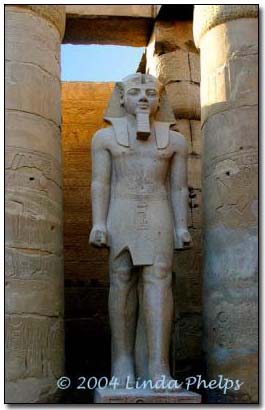
The image above is an example of a pale sky replacing a totally blown out sky. This figure stands between the columns of Luxor Temple in Egypt.


Risk free OPEN YOUR OWN GALLERY & SELL YOUR PHOTOGRAPHS ONLINE

PROMOTION TODAY: A 25% discount is available for a Professional Gallery Registration.
PROMOTION ENDS: .

RISK FREE GUARANTEED: If you're not satisfied with The Gallery, cancel anytime within 30 days, and you will receive a FULL refund.
 Click here to about the gallery.

Outdoor Eyes Welcomes The Newest Gallery Members: Chris Elsom, Nimrat Singh
  
The Gallery Photography Outdoor Adventure Forum Contact OE Estes Park APP Site Map Blog 7522 Web TV Enjoy Estes Park Home

casinoGUMP

Use Of Information    © 2000-   All rights reserved.  Privacy & Terms

